|
OverView
Quick Start
- The Main Page
- Setup
- Server List
- Server Select
- Rule List
- Edit Rule
- E-Mail Setup
|
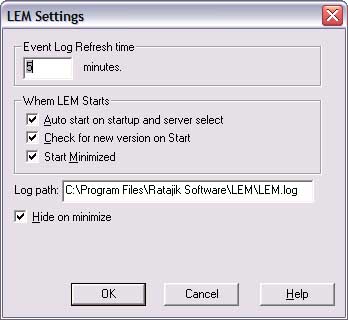
The LEM Settings screen will allow you to customize how
LEM works.
Areas of interest:
-
Refresh Time. How often LEM will read from the servers you
have setup.
-
Auto Start. If you would like to have LEM read the logs on
start, click on this. If you don't click this, then you will need to
press "Read" to start LEM reading.
-
Check for New version. Check on the web for a new version
of LEM. If a new version is found, a dialog will be displayed with
information about the new version.
-
Start Minimized. Selecting this will make LEM start
mimized.
-
Log Path. Where LEM will log to (LEM will limit the log to
100k).
-
Hide on minimize. Click this if you'd like LEM to put itself in
the tray when you click the minimize button.
-
OK. Save all changes.
-
Cancel. Discard all changes made from this screen or any
screen that you changed information on.
-
Help. Brings up the help page for this screen.
|