|
OverView
Quick Start
- The Main Page
- Setup
- Server List
- Server Select
- Rule List
- Edit Rule
- E-Mail Setup
|
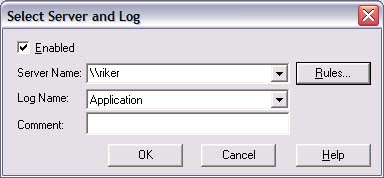
The sever select screen allows you to setup specific information
about a server and log.
Areas of interest:
-
Enable. If this is checked, LEM will read this servers
log. If it isn't, no processing will happen for this server. The
value displayed will be the name of the server you are editing, or the last
server selected if you are adding a new one.
-
Log Name. This is the Log (Application, Security, or
System) that you would like to have LEM process. If you want to read more
than one log, you'll need to set up multiple servers, one per log.
-
Comment. Any other information you'd like to display about
the server.
-
Rules. Click this to setup rules for this server.
-
OK. Save all changes.
-
Cancel. Discard all changes made from this screen or any
screen that you changed information on.
-
Help. Brings up the help page for this screen.
|