|
OverView
Quick Start
- The Main Page
- Setup
- Server List
- Server Select
- Rule List
- Edit Rule
- E-Mail Setup
|
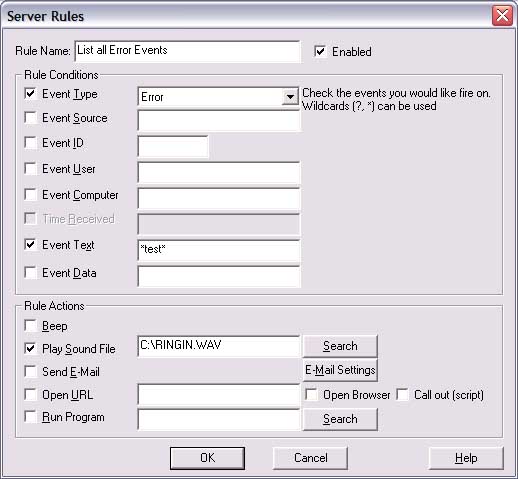
This screen will allow you to set up a rule, and what should
happen when the rule fires. When a new event is read in, LEM will look at
the "Rule Condition" portion of this screen to determine if the rule should
fire. If any of the conditions are true, then LEM will do whatever is in
the "Rule Actions" portion. So, for example, and "Error" events will have
a cound played and send e-mail, in the above example.
On the rule condition fields, the '*' and '?' wild-cards may be
used. In the above example, and Errors with the text "test" in them will
(and only will) fire the Rule Action.
NOTE: For the condition to evaluate, you MUST check the box to the
left. Just entering information to the right won't cause the rule to
fire.
Areas of interest:
Rule Conditions (These are "AND", e.g., any of them evaluation as
true will cause the rule to fire.)
Rule Conditions:
-
Event Type. Choose from any of the 5 basic types
(Info, Warning, Error, 2 Audit types) or "Any" for any type of event.
-
Event Source. This is general the program name that
generated the error.
-
Event ID. Program-specific Error ID.
-
Event User. The user name that generated the error.
-
Event Computer. The SERVER that generated the error.
-
Event Text. The text of the event must equal this field (field can be a
wildcard).
-
Event Data. The data of the event must equal this field
(field can be a wildcard).ds
Rule Actions:
-
Beep. Plays a quick beep on the computers speaker.
-
Play Sound file. Plays the indicated wave file (press
search to find one to play).
-
Send E-Mail. Press the E-Mail Settings button to setup the
specifics for the e-mail
-
Open URL. This will either pop a new browser window (If you
check "open browser") or will call a script behind the scenes (if you check
"Call out"). You can actually pass all of the information about the event
via this, so, for example, you could write a perl script on a server someplace
that would you could pass all the "Error" events that contain "test" in the
text. The perl script could then do something else (like save this info
to a database, perform counting, whatever). This allows you to
extend the functionallity of LEM to do whatever you need it to do. See
the Developers Section for more information.
-
Run Program. This also lets you extend the functionality of
LEM in the same way as Open URL, expect this will allow you to run a program on
the local machine. The program will be send all the information LEM has
available, and can act upon it. See the Developers Section for more
information.
-
OK. Save changes
-
Cancel. Discard changes
-
Help. This page.
|